Aggregating surface water
In nlmod, surface water is mostly added to a groundwater model using a GeoDataFrame with surface water features. nlmod can generate input from this GeoDataFrame for the DRN- RIV or LAK-packages. Each individual record can directly be added to these packages. Aggregation of surface water features in cells is also possible, using different aggregation-methods.
This section demonstrates how to aggrgate surface water features into model cells and add them to a MODFLOW model. In this notebook we perform a steady-state run, in which the stage of the surface water is the mean of the summer and winter stage. The surface water bodies in each cell are aggregated using an area-weighted method and added to the model with the river-package.
import os
import matplotlib.pyplot as plt
import pandas as pd
import geopandas as gpd
import flopy
import nlmod
Model settings
We define some model settings, like the name, the directory of the model files, the model extent and the time
model_name = "Schoonhoven"
model_ws = "03_aggregating_surface_water"
figdir, cachedir = nlmod.util.get_model_dirs(model_ws)
extent = [116_500, 120_000, 439_000, 442_000]
time = pd.date_range("2020", "2023", freq="MS")  # monthly timestep
layer ‘waterdeel’ from bgt
The location of the surface water bodies is obtained from the GeoDataFrame that was created in the the surface water notebook. We saved this data as a geosjon file and load it here.
fname_bgt = os.path.join("..", "data_sources", "02_surface_water", "cache", "bgt.gpkg")
if not os.path.isfile(fname_bgt):
    raise (
        Exception(
            f"{fname_bgt} not found. Please run notebook 02_surface_water.ipynb in the 'data_sources' directory first"
        )
    )
bgt = gpd.read_file(fname_bgt)
Change some values in the GeoDataFrame for this model
sfw = bgt
sfw["stage"] = sfw[["winter_stage", "summer_stage"]].mean(1)
# use a water depth of 0.5 meter
sfw["botm"] = sfw["stage"] - 0.5
# set the stage of the Lek to 0.0 m NAP and the botm to -3 m NAP
mask = sfw["bronhouder"] == "L0002"
sfw.loc[mask, "stage"] = 0.0
sfw.loc[mask, "botm"] = -3.0
Take a look at the first few rows. For adding surface water features to a MODFLOW model the following attributes must be present:
stage: the water level (in m NAP)
botm: the bottom elevation (in m NAP)
c0: the bottom resistance (in days)
The stage and the botm columns are present in our dataset. The bottom resistance c0 is rarely known, and is usually estimated when building the model. We will add our estimate later on.
Note
The NaN’s in the dataset indicate that not all parameters are known for each feature. This is not necessarily a problem but this will mean some features will not be converted to model input.
Now use stage as the column to color the data. Note the missing features caused by the fact that the stage is undefined (NaN).
fig, ax = nlmod.plot.get_map(extent)
sfw.plot(ax=ax, column="stage", legend=True);

Build model
The next step is to define a model grid and build a model (i.e. create a discretization and define flow parameters).
Build the model. We’re keeping the model as simple as possible.
delr = delc = 50.0
start_time = "2021-01-01"
# layer model
layer_model = nlmod.read.download_regis(
    extent, cachedir=cachedir, cachename="layer_model.nc"
)
layer_model
Botm of layer is not equal to top of deeper layer in 3 cells
<xarray.Dataset> Size: 371kB
Dimensions:      (y: 30, x: 35, layer: 29)
Coordinates:
  * y            (y) float64 240B 4.42e+05 4.418e+05 ... 4.392e+05 4.39e+05
  * x            (x) float64 280B 1.166e+05 1.166e+05 ... 1.198e+05 1.2e+05
  * layer        (layer) <U8 928B 'HLc' 'KRWYk1' 'KRz2' ... 'OOz2' 'OOc' 'BRk1'
    spatial_ref  int64 8B 0
Data variables:
    top          (y, x) float32 4kB -1.28 -1.22 -1.25 ... -4.05 -3.76 -4.21
    botm         (layer, y, x) float32 122kB -12.26 -12.11 ... -593.9 -595.5
    kh           (layer, y, x) float32 122kB nan nan nan nan ... nan nan nan nan
    kv           (layer, y, x) float32 122kB nan nan nan ... 0.002 0.002 0.002
Attributes: (12/41)
    references:                    https://www.dinoloket.nl/regis-ii-het-hydr...
    Conventions:                   CF-1.7
    creator_url:                   https://www.dinoloket.nl
    keywords_vocabulary:           NASA/GCMD Earth Science Keywords. Version 6.0
    acknowledgment:                https://www.dinoloket.nl
    project:                       REGIS v02r2s3
    ...                            ...
    geospatial_vertical_min:       -1235.92
    geospatial_vertical_max:       322.75
    geospatial_vertical_units:     m-NAP
    geospatial_vertical_positive:  up
    gridtype:                      structured
extent: [116500, 120000, 439000, 442000]# create a model ds by changing grid of layer_model
ds = nlmod.to_model_ds(layer_model, model_name, model_ws, delr=delr, delc=delc)
# create model time dataset
ds = nlmod.time.set_ds_time(ds, start=start_time, steady=True, perlen=1)
ds
<xarray.Dataset> Size: 2MB
Dimensions:      (y: 60, x: 70, layer: 29, time: 1)
Coordinates:
  * y            (y) float64 480B 4.42e+05 4.419e+05 ... 4.391e+05 4.39e+05
  * x            (x) float64 560B 1.165e+05 1.166e+05 ... 1.199e+05 1.2e+05
  * layer        (layer) <U8 928B 'HLc' 'KRWYk1' 'KRz2' ... 'OOz2' 'OOc' 'BRk1'
  * time         (time) datetime64[ns] 8B 2021-01-02
    spatial_ref  int64 8B 0
Data variables:
    top          (y, x) float32 17kB -1.28 -1.28 -1.22 ... -3.76 -4.21 -4.21
    botm         (layer, y, x) float32 487kB -12.26 -12.26 ... -595.5 -595.5
    kh           (layer, y, x) float32 487kB 1.0 1.0 1.0 1.0 ... 0.02 0.02 0.02
    kv           (layer, y, x) float32 487kB 0.1 0.1 0.1 ... 0.002 0.002 0.002
    area         (y, x) float64 34kB 2.5e+03 2.5e+03 2.5e+03 ... 2.5e+03 2.5e+03
    steady       (time) int64 8B 1
    nstp         (time) int64 8B 1
    tsmult       (time) float64 8B 1.0
Attributes:
    extent:      [116500, 120000, 439000, 442000]
    gridtype:    structured
    model_name:  Schoonhoven
    mfversion:   mf6
    created_on:  20260513_15:16:24
    exe_name:    /home/docs/checkouts/readthedocs.org/user_builds/nlmod/envs/...
    model_ws:    03_aggregating_surface_water
    figdir:      03_aggregating_surface_water/figure
    cachedir:    03_aggregating_surface_water/cache
transport: 0# create simulation
sim = nlmod.sim.sim(ds)
# create time discretisation
tdis = nlmod.sim.tdis(ds, sim)
# create ims
ims = nlmod.sim.ims(sim)
# create groundwater flow model
gwf = nlmod.gwf.gwf(ds, sim)
# Create discretization
dis = nlmod.gwf.dis(ds, gwf)
# create node property flow
npf = nlmod.gwf.npf(ds, gwf)
# Create the initial conditions package
ic = nlmod.gwf.ic(ds, gwf, starting_head=1.0)
# Create the output control package
oc = nlmod.gwf.oc(ds, gwf)
Add surface water
Now that we have a discretization (a grid, and layer tops and bottoms) we can start processing our surface water shapefile to add surface water features to our model. The method to add surface water starting from a shapefile is divided into the following steps:
Intersect surface water shape with grid. This steps intersects every feature with the grid so we can determine the surface water features in each cell.
Aggregate parameters per grid cell. Each feature within a cell has its own parameters. For MODFLOW it is often desirable to have one representative set of parameters per cell. These representative parameters are calculated in this step.
Build stress period data. The results from the previous step are converted to stress period data (generally a list of cellids and representative parameters:
[(cellid), parameters]) which is used by MODFLOW and flopy to define boundary conditions.Create the Modflow6 package
The steps are illustrated below.
Intersect surface water shape with grid
The first step is to intersect the surface water shapefile with the grid.
sfw_grid = nlmod.grid.gdf_to_grid(
    sfw, gwf, cachedir=ds.cachedir, cachename="sfw_grid.pklz"
)
Intersecting with grid:   0%|          | 0/1470 [00:00<?, ?it/s]
Intersecting with grid: 100%|██████████| 1470/1470 [00:06<00:00, 214.03it/s]
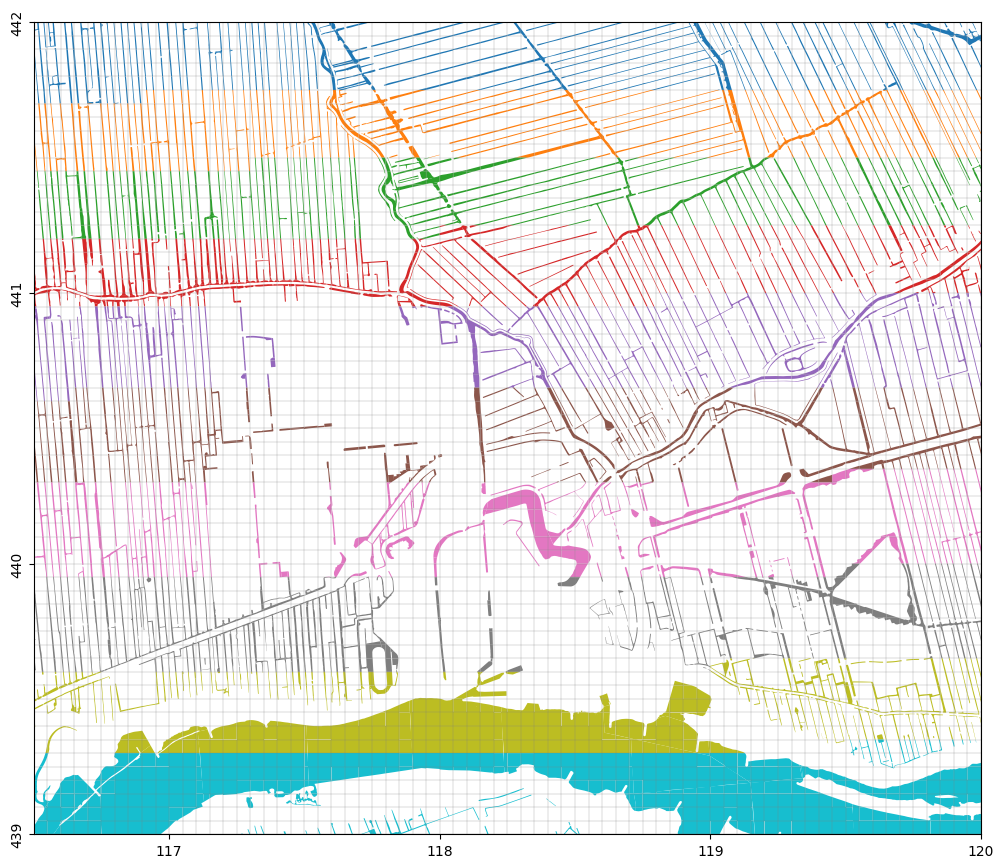
Plot the result and the model grid and color using cellid. It’s perhaps a bit hard to see but each feature is cut by the gridlines.
fig, ax = nlmod.plot.get_map(extent)
sfw_grid.plot(ax=ax, column="cellid")
nlmod.plot.modelgrid(ds, ax=ax, lw=0.2);
Aggregate parameters per model cell
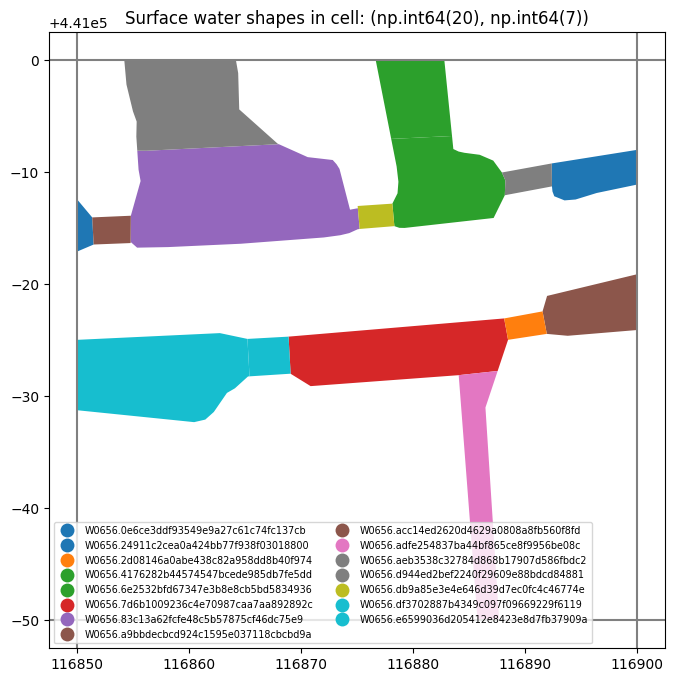
The next step is to aggregate the parameters for all the features in one grid cell to obtain one representative set of parameters. First, let’s take a look at a grid cell containing multiple features. We take the gridcell that contains the most features.
cid = sfw_grid.cellid.value_counts().index[0]
mask = sfw_grid.cellid == cid
sfw_grid.loc[mask]
| id | creationDate | LV-publicatiedatum | relatieveHoogteligging | inOnderzoek | eindRegistratie | tijdstipRegistratie | identificatie | bronhouder | bgt-status | ... | terminationDate | bronhouder_name | ahn_min | summer_stage | winter_stage | geometry | stage | botm | cellid | area | |
|---|---|---|---|---|---|---|---|---|---|---|---|---|---|---|---|---|---|---|---|---|---|
| 559 | b5a53b635-d396-a910-bd9c-46e8226ec4a4 | 2015-10-29 | 2016-07-06T15:37:15 | 0 | false | None | 2016-01-04T08:50:54.000 | W0656.4176282b44574547bcede985db7fe5dd | W0656 | bestaand | ... | None | Hoogheemraadschap van Schieland en de Krimpene... | -1.803157 | -1.91 | -1.96 | POLYGON ((116883.486 440993.24, 116878.898 440... | -1.935 | -2.435 | (20, 7) | 39.950023 |
| 578 | bc1e73327-d135-b9e7-e13c-17b8c4083248 | 2015-10-29 | 2016-07-06T15:37:15 | 0 | false | None | 2016-01-04T08:50:54.000 | W0656.83c13a62fcfe48c5b57875cf46dc75e9 | W0656 | bestaand | ... | None | Hoogheemraadschap van Schieland en de Krimpene... | NaN | -1.91 | -1.96 | POLYGON ((116873.44 440990.3, 116874.38 440986... | -1.935 | -2.435 | (20, 7) | 156.916996 |
| 636 | b277c12a5-3966-6d28-3aed-f2dd400195d7 | 2015-10-29 | 2019-08-16T18:44:11 | 0 | false | None | 2019-08-15T15:24:33.000 | W0656.0e6ce3ddf93549e9a27c61c74fc137cb | W0656 | bestaand | ... | None | Hoogheemraadschap van Schieland en de Krimpene... | -1.149745 | -1.91 | -1.96 | POLYGON ((116851.36 440985.97, 116851.49 44098... | -1.935 | -2.435 | (20, 7) | 5.025221 |
| 641 | bf86d3648-d739-c6cd-27fa-37eff9c50db0 | 2015-10-29 | 2019-08-16T18:44:11 | 0 | false | None | 2019-08-15T15:24:33.000 | W0656.24911c2cea0a424bb77f938f03018800 | W0656 | bestaand | ... | None | Hoogheemraadschap van Schieland en de Krimpene... | NaN | -1.91 | -1.96 | POLYGON ((116896.4 440988.15, 116894.52 440987... | -1.935 | -2.435 | (20, 7) | 24.901125 |
| 649 | bf005c07a-c701-61c5-bb2f-4e279861ae3b | 2015-10-29 | 2019-08-16T18:44:11 | 0 | false | None | 2019-08-15T15:24:33.000 | W0656.6e2532bfd67347e3b8e8cb5bd5834936 | W0656 | bestaand | ... | None | Hoogheemraadschap van Schieland en de Krimpene... | -1.619307 | -1.91 | -1.96 | POLYGON ((116883.486 440993.24, 116883.604 440... | -1.935 | -2.435 | (20, 7) | 65.424827 |
| 652 | bc9da9d09-dd92-11a5-0d43-1a2d2bb95237 | 2015-10-29 | 2019-08-16T18:44:11 | 0 | false | None | 2019-08-15T15:24:33.000 | W0656.7d6b1009236c4e70987caa7aa892892c | W0656 | bestaand | ... | None | Hoogheemraadschap van Schieland en de Krimpene... | NaN | -1.91 | -1.96 | POLYGON ((116888.49 440975.04, 116887.562 4409... | -1.935 | -2.435 | (20, 7) | 87.909658 |
| 665 | be5f3176f-bdab-4958-3908-52dfc31cf0b6 | 2015-10-29 | 2019-08-16T18:44:11 | 0 | false | None | 2019-08-15T15:24:33.000 | W0656.acc14ed2620d4629a0808a8fb560f8fd | W0656 | bestaand | ... | None | Hoogheemraadschap van Schieland en de Krimpene... | NaN | -1.91 | -1.96 | POLYGON ((116900 440980.894, 116900 440975.915... | -1.935 | -2.435 | (20, 7) | 35.290249 |
| 673 | b89dd3d14-6605-3507-61c7-91e2c24510a5 | 2015-10-29 | 2019-08-16T18:44:11 | 0 | false | None | 2019-08-15T15:24:33.000 | W0656.d944ed2bef2240f29609e88bdcd84881 | W0656 | bestaand | ... | None | Hoogheemraadschap van Schieland en de Krimpene... | -1.728949 | -1.91 | -1.96 | POLYGON ((116855.33 440994.53, 116855 440995.4... | -1.935 | -2.435 | (20, 7) | 81.433112 |
| 703 | bfd6384e1-9c87-7300-1242-8ac4111813ed | 2019-08-15 | 2019-08-16T18:44:11 | 0 | false | None | 2019-08-15T15:24:33.000 | W0656.2d08146a0abe438c82a958dd8b40f974 | W0656 | bestaand | ... | None | Hoogheemraadschap van Schieland en de Krimpene... | NaN | -1.91 | -1.96 | POLYGON ((116891.95 440975.57, 116888.49 44097... | -1.935 | -2.435 | (20, 7) | 6.963900 |
| 733 | b3c18517a-b046-66d5-c912-f6d5f9e438b4 | 2019-08-15 | 2019-08-16T18:44:11 | 0 | false | None | 2019-08-15T15:24:33.000 | W0656.a9bbdecbcd924c1595e037118cbcbd9a | W0656 | bestaand | ... | None | Hoogheemraadschap van Schieland en de Krimpene... | -1.186425 | -1.91 | -1.96 | POLYGON ((116854.79 440983.78, 116854.79 44098... | -1.935 | -2.435 | (20, 7) | 8.207950 |
| 735 | b3b28a62e-eada-92d7-c249-5b5c7bae33a7 | 2019-08-15 | 2019-08-16T18:44:11 | 0 | false | None | 2019-08-15T15:24:33.000 | W0656.aeb3538c32784d868b17907d586fbdc2 | W0656 | bestaand | ... | None | Hoogheemraadschap van Schieland en de Krimpene... | -1.376571 | -1.91 | -1.96 | POLYGON ((116887.94 440989.98, 116892.39 44099... | -1.935 | -2.435 | (20, 7) | 8.722850 |
| 748 | b930236e9-d146-ba44-fc3a-3ec17fb6173f | 2019-08-15 | 2019-08-16T18:44:11 | 0 | false | None | 2019-08-15T15:24:33.000 | W0656.db9a85e3e4e646d39d7ec0fc4c46774e | W0656 | bestaand | ... | None | Hoogheemraadschap van Schieland en de Krimpene... | -1.404209 | -1.91 | -1.96 | POLYGON ((116878.34 440985.19, 116875.24 44098... | -1.935 | -2.435 | (20, 7) | 6.333950 |
| 751 | b2a8e0641-7b6f-1650-6fce-9faa01a3d119 | 2019-08-15 | 2019-08-16T18:44:11 | 0 | false | None | 2019-08-15T15:24:33.000 | W0656.df3702887b4349c097f09669229f6119 | W0656 | bestaand | ... | None | Hoogheemraadschap van Schieland en de Krimpene... | -0.847543 | -1.91 | -1.96 | POLYGON ((116869.078 440972.009, 116869.066 44... | -1.935 | -2.435 | (20, 7) | 12.250377 |
| 824 | b40349d0e-96cc-0253-efd2-a26f5f668705 | 2015-10-29 | 2021-04-12T14:12:16 | 0 | false | None | 2021-04-12T12:25:19.000 | W0656.e6599036d205412e8423e8d7fb37909a | W0656 | bestaand | ... | None | Hoogheemraadschap van Schieland en de Krimpene... | -1.422086 | -1.91 | -1.96 | POLYGON ((116864.1 440970.71, 116863.39 440970... | -1.935 | -2.435 | (20, 7) | 102.696517 |
| 847 | b60842130-ff94-9d63-daa5-457cefa454da | 2021-06-07 | 2021-06-07T11:35:51 | 0 | false | None | 2021-06-07T11:32:43.000 | W0656.adfe254837ba44bf865ce8f9956be08c | W0656 | bestaand | ... | None | Hoogheemraadschap van Schieland en de Krimpene... | -1.446577 | -1.91 | -1.96 | POLYGON ((116884.286 440969.237, 116884.082 44... | -1.935 | -2.435 | (20, 7) | 47.496899 |
15 rows × 23 columns
We can also plot the features within that grid cell.
fig, ax = plt.subplots(1, 1, figsize=(10, 8))
sfw_grid.loc[mask].plot(
    column="identificatie",
    legend=True,
    ax=ax,
    legend_kwds={"loc": "lower left", "ncol": 2, "fontsize": "x-small"},
)
xlim = ax.get_xlim()
ylim = ax.get_ylim()
gwf.modelgrid.plot(ax=ax)
ax.set_xlim(xlim[0], xlim[0] + nlmod.grid.get_delr(ds)[-1] * 1.1)
ax.set_ylim(ylim)
ax.set_title(f"Surface water shapes in cell: {cid}");
Now we want to aggregate the features in each cell to obtain a representative set of parameters (stage, conductance, bottom elevation) to use in the model. There are several aggregation methods. Note that the names of the methods are not representative of the aggregation applied to each parameter. For a full description see the following list:
'area_weighted'stage: area-weighted average of stage in cell
cond: conductance is equal to area of surface water divided by bottom resistance
elev: the lowest bottom elevation is representative for the cell
'max_area'stage: stage is determined by the largest surface water feature in a cell
cond: conductance is equal to area of all surface water features divided by bottom resistance
elev: the lowest bottom elevation is representative for the cell
'de_lange'stage: area-weighted average of stage in cell
cond: conductance is calculated using the formulas derived by De Lange (1999).
elev: the lowest bottom elevation is representative for the cell
Let’s try using area_weighted. This means the stage is the area-weighted average of all the surface water features in a cell. The conductance is calculated by dividing the total area of surface water in a cell by the bottom resistance (c0). The representative bottom elevation is the lowest elevation present in the cell.
try:
    nlmod.gwf.surface_water.aggregate(sfw_grid, "area_weighted")
except ValueError as e:
    print(e)
Missing columns in DataFrame: {'c0'}
The function checks whether the requisite columns are defined in the DataFrame. We need to add a column containing the bottom resistance c0. Often a value of 1 day is used as an initial estimate.
sfw_grid["c0"] = 1.0 # days
Now aggregate the features.
celldata = nlmod.gwf.surface_water.aggregate(
    sfw_grid, "area_weighted", cachedir=ds.cachedir, cachename="celldata.pklz"
)
Aggregate surface water data:   0%|          | 0/3553 [00:00<?, ?it/s]
Aggregate surface water data: 100%|██████████| 3553/3553 [00:04<00:00, 771.53it/s]
Let’s take a look at the result. We now have a DataFrame with cell-id as the index and the three parameters we need for each cell stage, cond and rbot. The area is also given, but is not needed for the groundwater model.
celldata.head(10)
| stage | cond | rbot | area | ||
|---|---|---|---|---|---|
| 0 | 0 | -1.935 | 462.410287 | -2.435 | 462.410287 |
| 1 | -1.935 | 459.780508 | -2.435 | 459.780508 | |
| 2 | -1.935 | 491.005144 | -2.435 | 491.005144 | |
| 3 | -1.935 | 415.290645 | -2.435 | 415.290645 | |
| 4 | -1.935 | 499.529157 | -2.435 | 499.529157 | |
| 5 | -1.935 | 412.999363 | -2.435 | 412.999363 | |
| 6 | -1.935 | 347.403279 | -2.435 | 347.403279 | |
| 7 | -1.935 | 333.055784 | -2.435 | 333.055784 | |
| 8 | -1.935 | 201.044358 | -2.435 | 201.044358 | |
| 9 | -1.935 | 427.468514 | -2.435 | 427.468514 |
Build stress period data
The next step is to take our cell-data and build convert it to ‘stress period data’ for MODFLOW. This is a data format that defines the parameters in each cell in the following format:
[[(cellid1), param1a, param1b, param1c],
 [(cellid2), param2a, param2b, param2c],
 ...]
The required parameters are defined by the MODFLOW-package used:
RIV: for the river package
(stage, cond, rbot)DRN: for the drain package
(stage, cond)GHB: for the general-head-boundary package
(stage, cond)
We’re selecting the RIV package. We don’t have a bottom (rbot) for each reach in celldata. Therefore we remove the reaches where rbot is nan (not a number).
new_celldata = celldata.loc[~celldata.rbot.isna()]
print(f"removed {len(celldata)-len(new_celldata)} reaches because rbot is nan")
removed 57 reaches because rbot is nan
riv_spd = nlmod.gwf.surface_water.build_spd(new_celldata, "RIV", ds)
Building stress period data RIV:   0%|          | 0/3496 [00:00<?, ?it/s]
Building stress period data RIV: 100%|██████████| 3496/3496 [00:00<00:00, 5650.10it/s]
Take a look at the stress period data for the river package:
riv_spd[:10]
[[(np.int64(0), 0, 0),
  np.float64(-1.935),
  np.float64(462.4102867442484),
  np.float64(-2.435)],
 [(np.int64(0), 0, 1),
  np.float64(-1.9349999999999998),
  np.float64(459.780507649758),
  np.float64(-2.435)],
 [(np.int64(0), 0, 2),
  np.float64(-1.9350000000000003),
  np.float64(491.00514351109155),
  np.float64(-2.435)],
 [(np.int64(0), 0, 3),
  np.float64(-1.9349999999999996),
  np.float64(415.2906454126869),
  np.float64(-2.435)],
 [(np.int64(0), 0, 4),
  np.float64(-1.9350000000000003),
  np.float64(499.52915726560855),
  np.float64(-2.435)],
 [(np.int64(0), 0, 5),
  np.float64(-1.935),
  np.float64(412.99936270143803),
  np.float64(-2.435)],
 [(np.int64(0), 0, 6),
  np.float64(-1.935),
  np.float64(347.4032788950671),
  np.float64(-2.435)],
 [(np.int64(0), 0, 7),
  np.float64(-1.935),
  np.float64(333.05578372039884),
  np.float64(-2.435)],
 [(np.int64(0), 0, 8),
  np.float64(-1.9349999999999998),
  np.float64(201.04435784327512),
  np.float64(-2.435)],
 [(np.int64(0), 0, 9),
  np.float64(-1.9350000000000003),
  np.float64(427.4685140175443),
  np.float64(-2.435)]]
Create RIV package
The final step is to create the river package using flopy.
riv = flopy.mf6.ModflowGwfriv(gwf, stress_period_data=riv_spd)
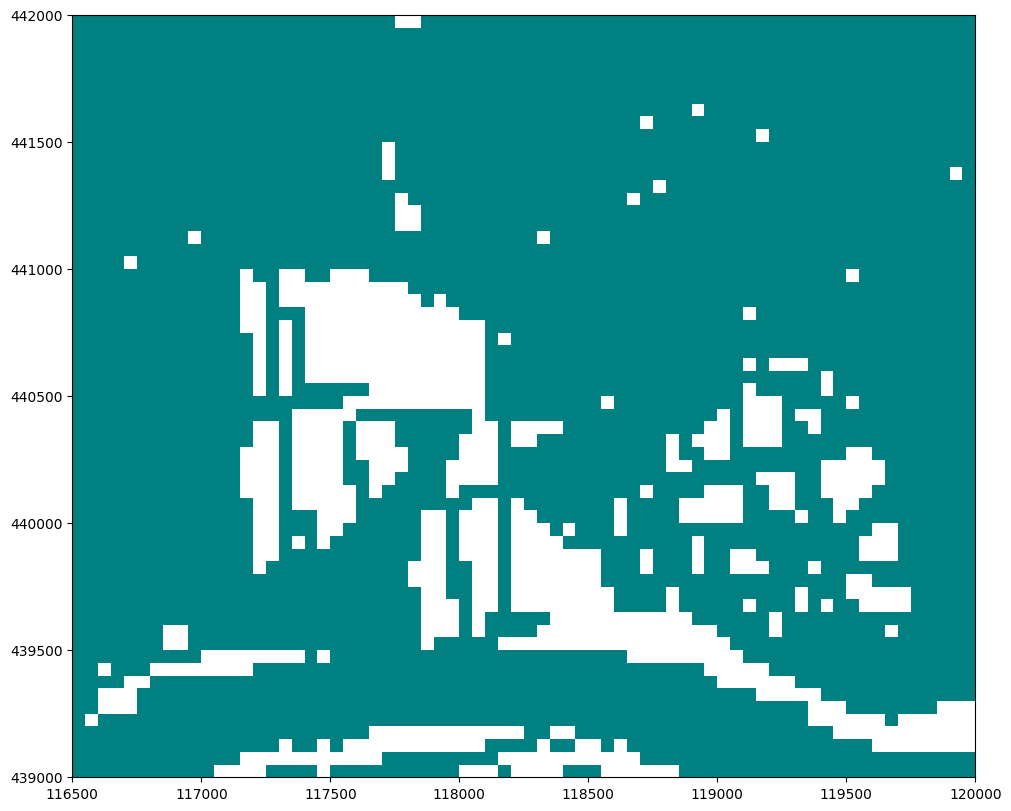
Plot the river boundary condition to see where rivers were added in the model
# use flopy plotting methods
fig, ax = plt.subplots(1, 1, figsize=(10, 8), constrained_layout=True)
mv = flopy.plot.PlotMapView(model=gwf, ax=ax, layer=0)
mv.plot_bc("RIV")
<matplotlib.collections.QuadMesh at 0x73d21a5360d0>
Write + run model
Now write the model simulation to disk, and run the simulation.
nlmod.sim.write_and_run(sim, ds, write_ds=True)
writing simulation...
  writing simulation name file...
  writing simulation tdis package...
  writing solution package ims...
  writing model Schoonhoven...
    writing model name file...
    writing package dis...
    writing package npf...
    writing package ic...
    writing package oc...
    writing package riv_0...
INFORMATION: maxbound in ('', 'riv', 'dimensions') changed to 3496 based on size of stress_period_data
FloPy is using the following executable to run the model: ../../../../../envs/latest/lib/python3.11/site-packages/nlmod/bin/mf6
                                   MODFLOW 6
                U.S. GEOLOGICAL SURVEY MODULAR HYDROLOGIC MODEL
                            VERSION 6.6.3 09/29/2025

   MODFLOW 6 compiled Oct 07 2025 22:51:46 with Intel(R) Fortran Intel(R) 64
   Compiler Classic for applications running on Intel(R) 64, Version 2021.7.0
                             Build 20220726_000000

This software has been approved for release by the U.S. Geological
Survey (USGS). Although the software has been subjected to rigorous
review, the USGS reserves the right to update the software as needed
pursuant to further analysis and review. No warranty, expressed or
implied, is made by the USGS or the U.S. Government as to the
functionality of the software and related material nor shall the
fact of release constitute any such warranty. Furthermore, the
software is released on condition that neither the USGS nor the U.S.
Government shall be held liable for any damages resulting from its
authorized or unauthorized use. Also refer to the USGS Water
Resources Software User Rights Notice for complete use, copyright,
and distribution information.


 MODFLOW runs in SEQUENTIAL mode

 Run start date and time (yyyy/mm/dd hh:mm:ss): 2026/05/13 15:16:40

 Writing simulation list file: mfsim.lst
 Using Simulation name file: mfsim.nam
    Solving:  Stress period:     1    Time step:     1

 Run end date and time (yyyy/mm/dd hh:mm:ss): 2026/05/13 15:16:40
 Elapsed run time:  0.670 Seconds

 Normal termination of simulation.
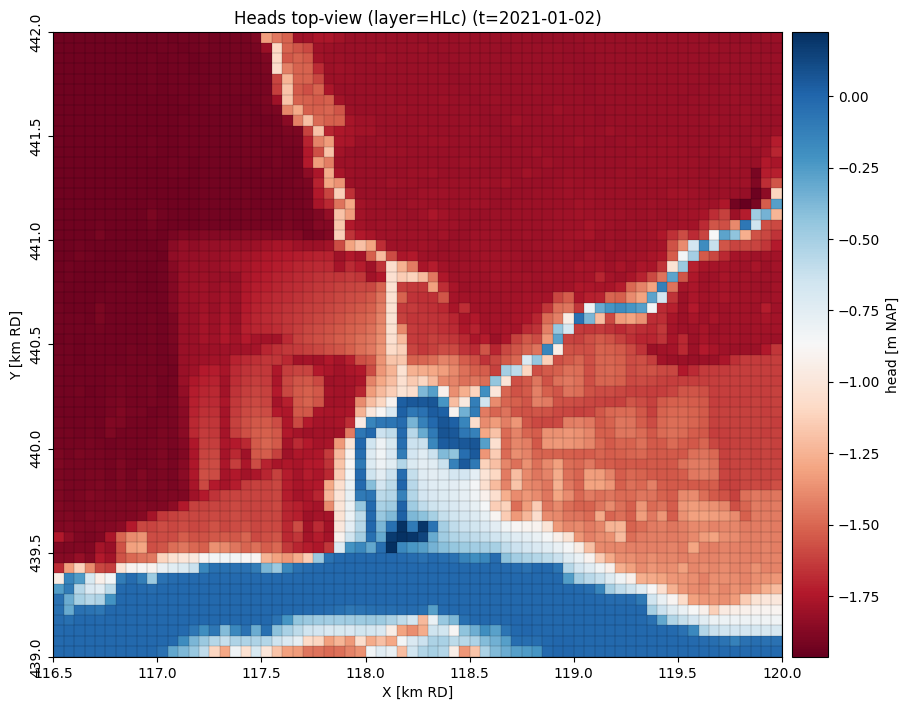
Visualize results
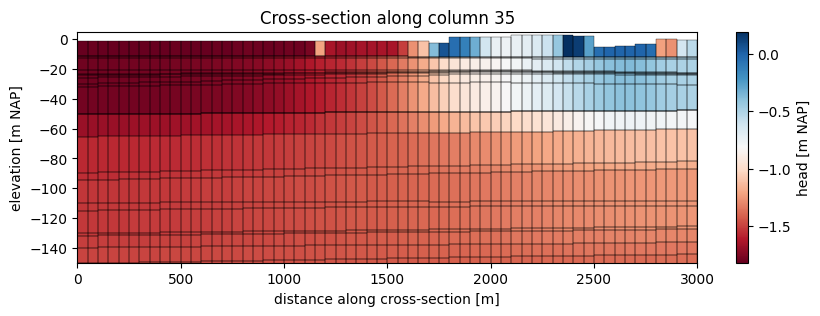
To see whether our surface water was correctly added to the model, let’s visualize the results. We’ll load the calculated heads, and plot them.
head = nlmod.gwf.get_heads_da(ds)
Plot the heads in a specific model layer
# using nlmod plotting methods
ax = nlmod.plot.map_array(
    head,
    ds,
    ilay=0,
    iper=0,
    plot_grid=True,
    title="Heads top-view",
    cmap="RdBu",
    colorbar_label="head [m NAP]",
)
In cross-section
# using flopy plotting methods
col = gwf.modelgrid.ncol // 2

fig, ax = plt.subplots(1, 1, figsize=(10, 3))
xs = flopy.plot.PlotCrossSection(model=gwf, ax=ax, line={"column": col})
qm = xs.plot_array(head[-1], cmap="RdBu")  # last timestep
xs.plot_ibound()  # plot inactive cells in red
xs.plot_grid(lw=0.25, color="k")
ax.set_ylim(bottom=-150)
ax.set_ylabel("elevation [m NAP]")
ax.set_xlabel("distance along cross-section [m]")
ax.set_title(f"Cross-section along column {col}")
cbar = fig.colorbar(qm, shrink=1.0)
cbar.set_label("head [m NAP]")