Modifying model layers
This notebook shows methods for modyfying model layers for MODFLOW models, for example by combining layers and splitting layers. Multiple layers can be combined into one layer or one layer can be split into sub-layers based on a fraction of the original thickness.
import matplotlib.pyplot as plt
import numpy as np
from shapely.geometry import LineString

import nlmod
from nlmod.plot import DatasetCrossSection
nlmod.util.get_color_logger("INFO")
nlmod.show_versions()
Python version     : 3.11.14
NumPy version      : 2.4.4
Xarray version     : 2026.4.0
Matplotlib version : 3.10.9
Flopy version      : 3.10.0

nlmod version      : 0.11.3dev
def compare_layer_models(
    ds1,
    line,
    colors,
    ds2=None,
    zmin=-200,
    zmax=10,
    min_label_area=1000,
    title1="REGIS original",
    title2="Modified layers",
    xlabel="Distance along x-sec (m)",
    ylabel="m NAP",
):
    if ds2 is None:
        fig, ax1 = plt.subplots(1, 1, figsize=(14, 6))
    else:
        fig, (ax1, ax2) = plt.subplots(2, 1, figsize=(14, 12), sharex=True)
    dcs1 = DatasetCrossSection(ds1, line=line, ax=ax1, zmin=zmin, zmax=zmax)
    polys2 = dcs1.plot_layers(colors=colors, min_label_area=min_label_area)
    dcs1.plot_grid(linewidth=0.5, vertical=False)
    ax1.set_ylabel(ylabel)

    if ds2 is not None:
        ax1.set_title(title1)
        dcs2 = DatasetCrossSection(ds2, line=line, ax=ax2, zmin=zmin, zmax=zmax)
        polys1 = dcs2.plot_layers(colors=colors, min_label_area=min_label_area)
        dcs2.plot_grid(linewidth=0.5, vertical=False)
        ax2.set_ylabel(ylabel)
        ax2.set_xlabel(xlabel)
        ax2.set_title(title2)
    else:
        ax1.set_xlabel(xlabel)
Get data
Define an extent to obtain REGIS
extent = [131000, 136800, 471500, 475700]
Download and cache REGIS netCDF.
regis = nlmod.read.regis.download_regis(extent)
WARNING:nlmod.dims.layers.remove_layer_dim_from_top:Botm of layer is not equal to top of deeper layer in 4 cells
Let’s take a look at the dataset
regis
<xarray.Dataset> Size: 1MB
Dimensions:      (y: 42, x: 58, layer: 34)
Coordinates:
  * y            (y) float64 336B 4.756e+05 4.756e+05 ... 4.716e+05 4.716e+05
  * x            (x) float64 464B 1.31e+05 1.312e+05 ... 1.366e+05 1.368e+05
  * layer        (layer) <U8 1kB 'HLc' 'BXz2' 'BXz3' ... 'OOz2' 'OOc' 'BRk1'
    spatial_ref  int64 8B 0
Data variables:
    top          (y, x) float32 10kB -1.35 -1.34 -1.37 ... -0.56 -0.31 -0.14
    botm         (layer, y, x) float32 331kB -5.54 -5.53 -5.52 ... -659.1 -659.3
    kh           (layer, y, x) float32 331kB nan nan nan nan ... nan nan nan nan
    kv           (layer, y, x) float32 331kB nan nan nan ... 0.002 0.002 0.002
Attributes: (12/41)
    references:                    https://www.dinoloket.nl/regis-ii-het-hydr...
    Conventions:                   CF-1.7
    creator_url:                   https://www.dinoloket.nl
    keywords_vocabulary:           NASA/GCMD Earth Science Keywords. Version 6.0
    acknowledgment:                https://www.dinoloket.nl
    project:                       REGIS v02r2s3
    ...                            ...
    geospatial_vertical_min:       -1235.92
    geospatial_vertical_max:       322.75
    geospatial_vertical_units:     m-NAP
    geospatial_vertical_positive:  up
    gridtype:                      structured
extent: [131000, 136800, 471500, 475700]Define an line to draw a cross-section
# diagonal line through extent
line = LineString([(extent[0], extent[2]), (extent[1], extent[3])])
Get colors for our cross-section plot.
colors = nlmod.read.regis.get_legend()["color"].to_dict()
Draw the cross-section for REGIS
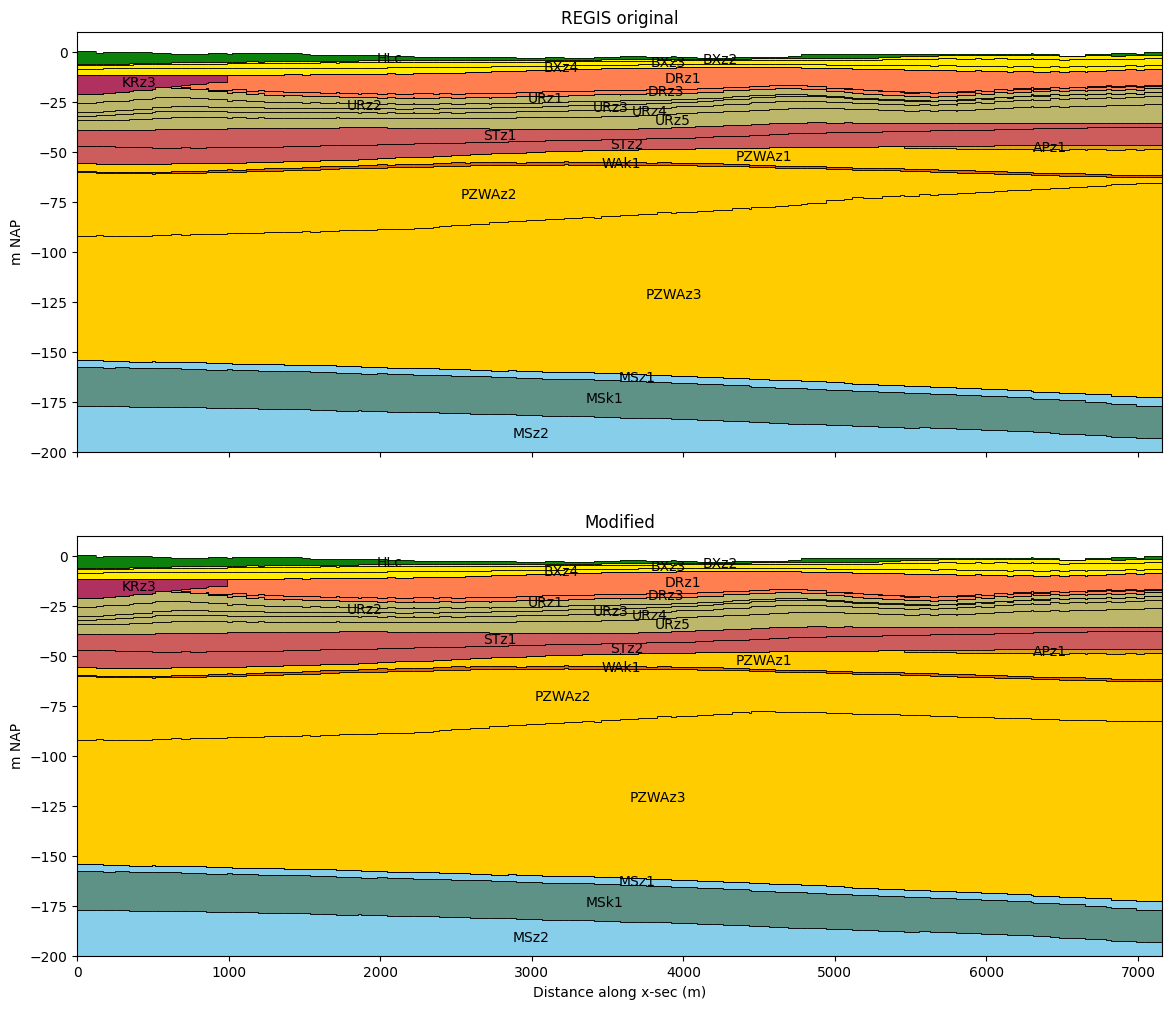
compare_layer_models(regis, line, colors)
Split layers
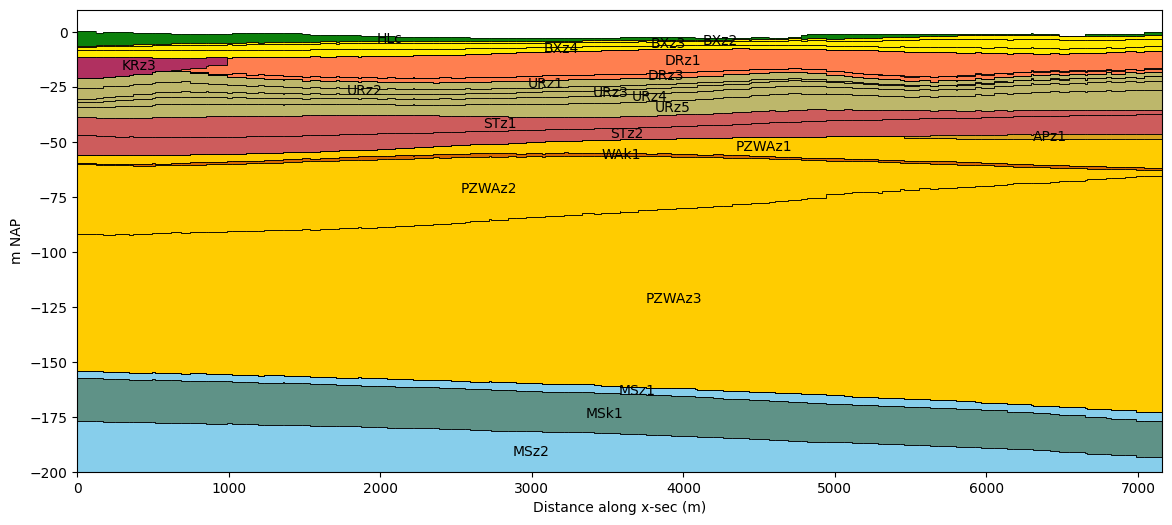
First we determine how to split the layers. This is done by creating a list of factors, that is used to determine fractions that add up to 1. The layer will be split into sub-layers from the top down, with each sub-layer getting a thickness equal to the fraction times the original thickness.
For example, (1, 1) will split the layer into two sub-layers, each getting a
thickness equal to 50% of the original layer. In this example the fractions already add
up to 1 for each layer.
# split dictionary
split_dict = {
    "PZWAz2": (0.3, 0.3, 0.4),
    "PZWAz3": (0.2, 0.2, 0.2, 0.2, 0.2),
}
Calculate the new layer elevations based on the information above.
regis_split, split_reindexer = nlmod.layers.split_layers_ds(
    regis, split_dict, return_reindexer=True
)
INFO:nlmod.dims.layers.split_layers_ds:Splitting layers ['PZWAz2', 'PZWAz3']
INFO:nlmod.dims.layers.split_layers_ds:Split 'PZWAz2' into 3 sub-layers
INFO:nlmod.dims.layers.split_layers_ds:Fill values for variable 'kh' in split layers with the values from the original layer.
INFO:nlmod.dims.layers.split_layers_ds:Fill values for variable 'kv' in split layers with the values from the original layer.
INFO:nlmod.dims.layers.split_layers_ds:Split 'PZWAz3' into 5 sub-layers
View the resulting Dataset:
regis_split
<xarray.Dataset> Size: 1MB
Dimensions:      (x: 58, y: 42, layer: 40)
Coordinates:
  * x            (x) float64 464B 1.31e+05 1.312e+05 ... 1.366e+05 1.368e+05
  * y            (y) float64 336B 4.756e+05 4.756e+05 ... 4.716e+05 4.716e+05
  * layer        (layer) <U8 1kB 'HLc' 'BXz2' 'BXz3' ... 'OOz2' 'OOc' 'BRk1'
    spatial_ref  int64 8B 0
Data variables:
    top          (y, x) float32 10kB -1.35 -1.34 -1.37 ... -0.56 -0.31 -0.14
    botm         (layer, y, x) float32 390kB -5.54 -5.53 -5.52 ... -659.1 -659.3
    kh           (layer, y, x) float32 390kB nan nan nan nan ... nan nan nan nan
    kv           (layer, y, x) float32 390kB nan nan nan ... 0.002 0.002 0.002
Attributes: (12/41)
    references:                    https://www.dinoloket.nl/regis-ii-het-hydr...
    Conventions:                   CF-1.7
    creator_url:                   https://www.dinoloket.nl
    keywords_vocabulary:           NASA/GCMD Earth Science Keywords. Version 6.0
    acknowledgment:                https://www.dinoloket.nl
    project:                       REGIS v02r2s3
    ...                            ...
    geospatial_vertical_min:       -1235.92
    geospatial_vertical_max:       322.75
    geospatial_vertical_units:     m-NAP
    geospatial_vertical_positive:  up
    gridtype:                      structured
extent: [131000, 136800, 471500, 475700]The reindexer dictionary links the new layers to the old layers. This can be convenient for copying data from the original layers to the new sub-layers.
# key = new layer index
# value = original layer index: repeats where layer was split
split_reindexer
{np.str_('HLc'): np.str_('HLc'),
 np.str_('BXz2'): np.str_('BXz2'),
 np.str_('BXz3'): np.str_('BXz3'),
 np.str_('BXz4'): np.str_('BXz4'),
 np.str_('KRz3'): np.str_('KRz3'),
 np.str_('DRz1'): np.str_('DRz1'),
 np.str_('DRz2'): np.str_('DRz2'),
 np.str_('DRz3'): np.str_('DRz3'),
 np.str_('DTc'): np.str_('DTc'),
 np.str_('URz1'): np.str_('URz1'),
 np.str_('URz2'): np.str_('URz2'),
 np.str_('URz3'): np.str_('URz3'),
 np.str_('URz4'): np.str_('URz4'),
 np.str_('URz5'): np.str_('URz5'),
 np.str_('STz1'): np.str_('STz1'),
 np.str_('STz2'): np.str_('STz2'),
 np.str_('APz1'): np.str_('APz1'),
 np.str_('PZWAz1'): np.str_('PZWAz1'),
 np.str_('WAk1'): np.str_('WAk1'),
 'PZWAz2_1': 'PZWAz2',
 'PZWAz2_2': 'PZWAz2',
 'PZWAz2_3': 'PZWAz2',
 'PZWAz3_1': 'PZWAz3',
 'PZWAz3_2': 'PZWAz3',
 'PZWAz3_3': 'PZWAz3',
 'PZWAz3_4': 'PZWAz3',
 'PZWAz3_5': 'PZWAz3',
 np.str_('PZWAz4'): np.str_('PZWAz4'),
 np.str_('MSz1'): np.str_('MSz1'),
 np.str_('MSk1'): np.str_('MSk1'),
 np.str_('MSz2'): np.str_('MSz2'),
 np.str_('MSk2'): np.str_('MSk2'),
 np.str_('MSz3'): np.str_('MSz3'),
 np.str_('MSc'): np.str_('MSc'),
 np.str_('MSz4'): np.str_('MSz4'),
 np.str_('OOz1'): np.str_('OOz1'),
 np.str_('OOk1'): np.str_('OOk1'),
 np.str_('OOz2'): np.str_('OOz2'),
 np.str_('OOc'): np.str_('OOc'),
 np.str_('BRk1'): np.str_('BRk1')}
Plot the cross-section of the original and the new layer model.
compare_layer_models(regis, line, colors, ds2=regis_split, title2="Split layers")
Combine layers
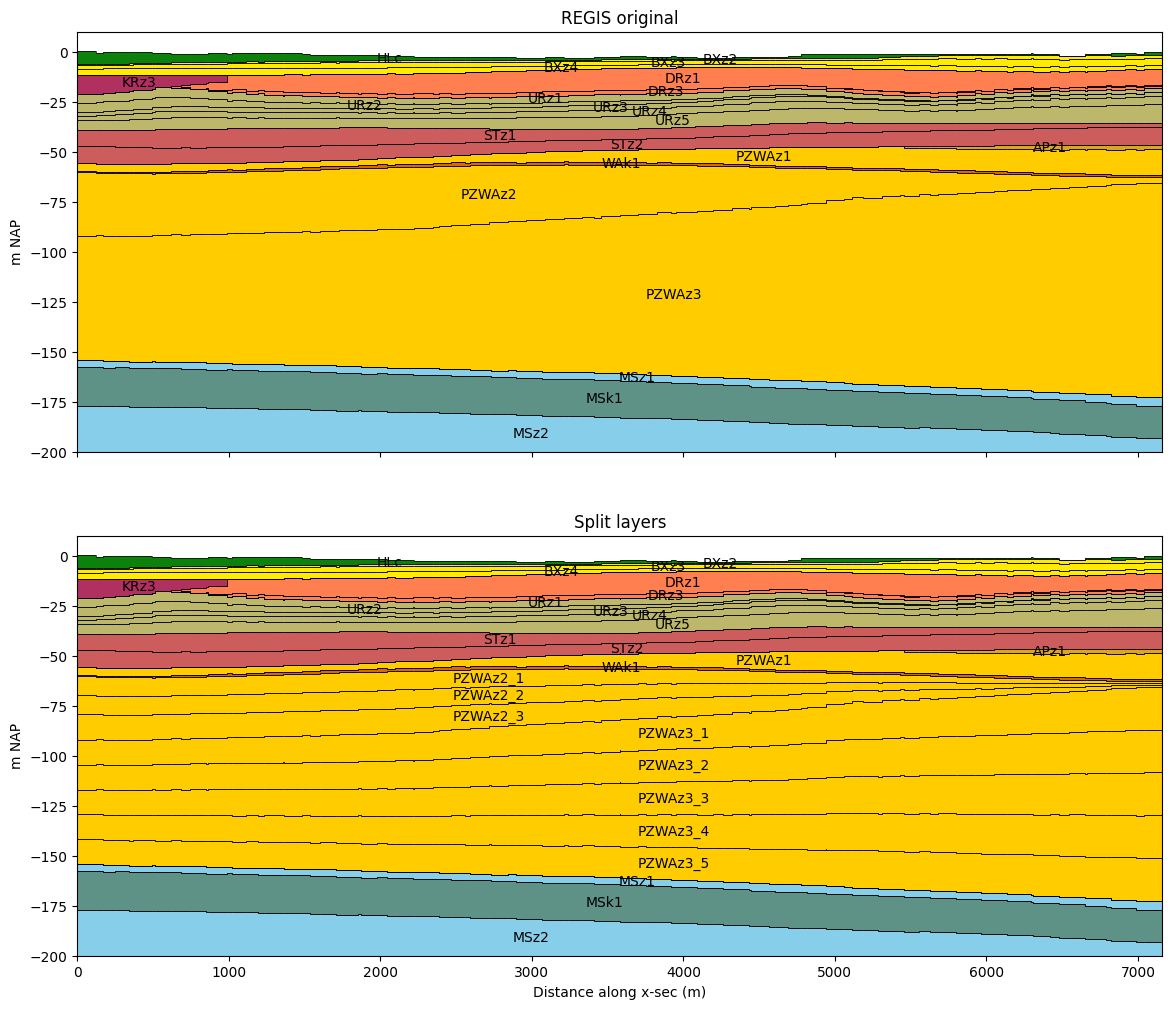
Example how to combine model layers. First find the indices of the layers to combine.
combine_layers = [
    tuple(np.argwhere(regis.layer.str.startswith("URz").data).squeeze().tolist()),
    tuple(np.argwhere(regis.layer.isin(["PZWAz2", "PZWAz3"]).data).squeeze().tolist()),
]
combine_layers
[(9, 10, 11, 12, 13), (19, 20)]
Combine layers using the combine_layers_ds() function and passing the layer dataset and the list of layer numbers to combine.
regis_combined = nlmod.layers.combine_layers_ds(regis, combine_layers, kD=None, c=None)
INFO:nlmod.dims.layers.combine_layers_ds:Calculating new layer tops and bottoms...
INFO:nlmod.dims.layers.combine_layers_ds:Calculate equivalent 'kh' for combined layers.
INFO:nlmod.dims.layers.combine_layers_ds:Calculate equivalent 'kv' for combined layers.
INFO:nlmod.dims.layers.combine_layers_ds:Done! Created new dataset with combined layers!
Take a look a the resulting dataset
regis_combined
<xarray.Dataset> Size: 2MB
Dimensions:  (y: 42, x: 58, layer: 29)
Coordinates:
  * y        (y) float64 336B 4.756e+05 4.756e+05 ... 4.716e+05 4.716e+05
  * x        (x) float64 464B 1.31e+05 1.312e+05 ... 1.366e+05 1.368e+05
  * layer    (layer) <U6 696B 'HLc' 'BXz2' 'BXz3' 'BXz4' ... 'OOz2' 'OOc' 'BRk1'
Data variables:
    top      (y, x) float64 19kB -1.35 -1.34 -1.37 -1.42 ... -0.56 -0.31 -0.14
    botm     (layer, y, x) float64 565kB -5.54 -5.53 -5.52 ... -659.1 -659.3
    kh       (layer, y, x) float64 565kB nan nan nan nan nan ... nan nan nan nan
    kv       (layer, y, x) float64 565kB nan nan nan nan ... 0.002 0.002 0.002
Attributes: (12/41)
    references:                    https://www.dinoloket.nl/regis-ii-het-hydr...
    Conventions:                   CF-1.7
    creator_url:                   https://www.dinoloket.nl
    keywords_vocabulary:           NASA/GCMD Earth Science Keywords. Version 6.0
    acknowledgment:                https://www.dinoloket.nl
    project:                       REGIS v02r2s3
    ...                            ...
    geospatial_vertical_min:       -1235.92
    geospatial_vertical_max:       322.75
    geospatial_vertical_units:     m-NAP
    geospatial_vertical_positive:  up
    gridtype:                      structured
extent: [131000, 136800, 471500, 475700]Plot the new and the old cross-section. Use the layer code and color from the first layer name for the combined layer
compare_layer_models(regis, line, colors, ds2=regis_combined, title2="Combined layers")
Set new model top
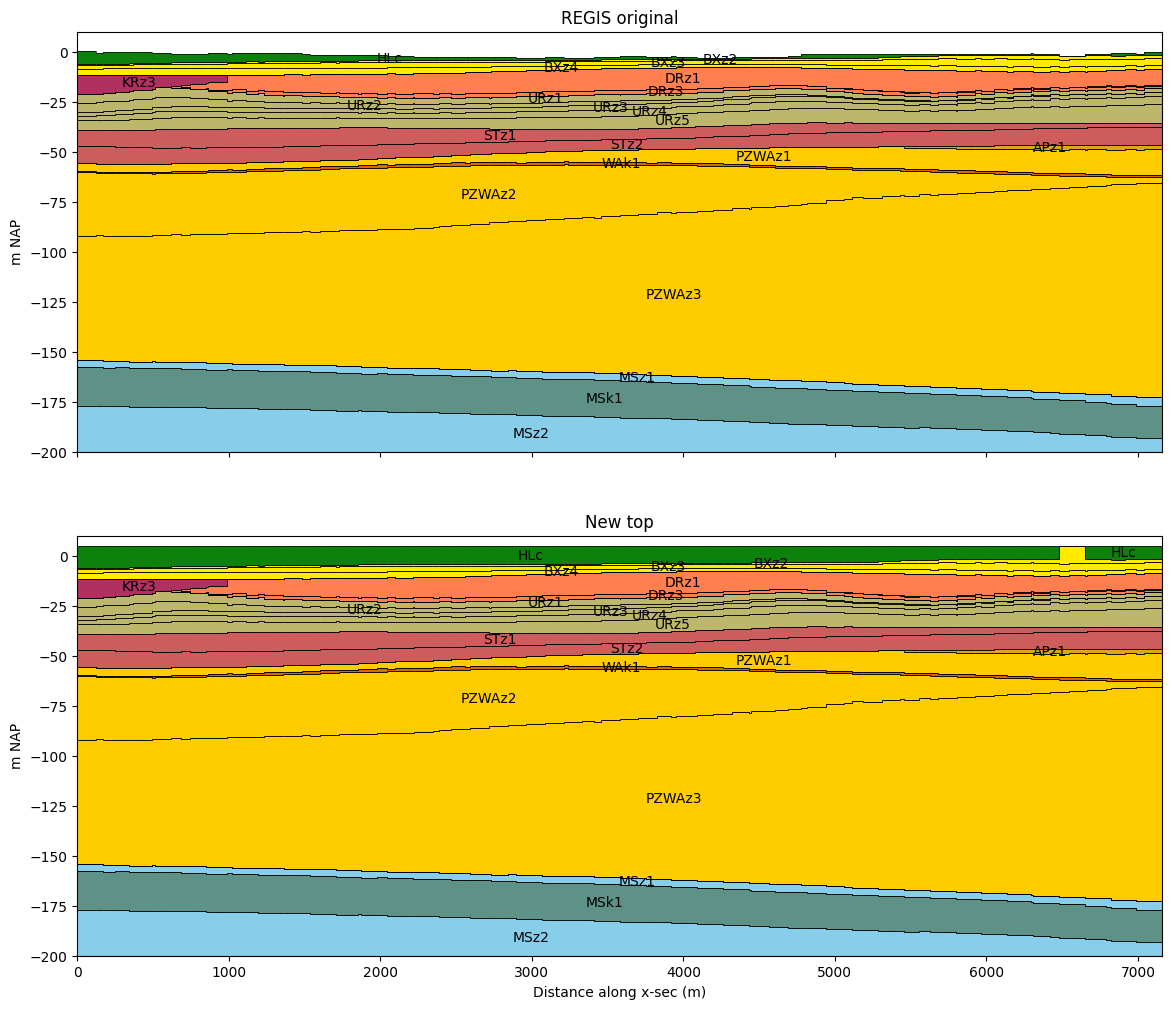
The nlmod.layers.set_model_top changes the top of the model. When the new top is
lower than the old top, the new top is burned in the layer model, lowering the top of
the top layer(s). Top layers can become incactive, when the thickness is reduced to 0.
When the new top is higher than the old top, the thickness of the most upper active
layer (not necessarily the first) is increased. This method can be used to change the
model top to a digital terrain model with a higher accuracy.
First transform the regis-date to a model Dataset, as the next methods need a model Dataset.
ds = nlmod.to_model_ds(regis)
INFO:nlmod.dims.base.to_model_ds:resample layer model data to structured modelgrid
INFO:nlmod.dims.layers.get_kh_kv:kv and kh both undefined in layer HLc
INFO:nlmod.dims.layers.get_kh_kv:kv and kh both undefined in layer DTc
INFO:nlmod.dims.layers._fill_var:Filling 11886 values in active cells of kh by multipying kv with an anisotropy of 10
INFO:nlmod.dims.layers._fill_var:Filling 51924 values in active cells of kv by dividing kh by an anisotropy of 10
INFO:nlmod.dims.layers._fill_var:Filling 2485 values in active cells of kh with a value of 1.0 m/day
INFO:nlmod.dims.layers._fill_var:Filling 2485 values in active cells of kv with a value of 0.1 m/day
ds_new = nlmod.layers.set_model_top(ds.copy(deep=True), 5.0)
compare_layer_models(ds, line, colors, ds2=ds_new, title2="New top")
Set layer top
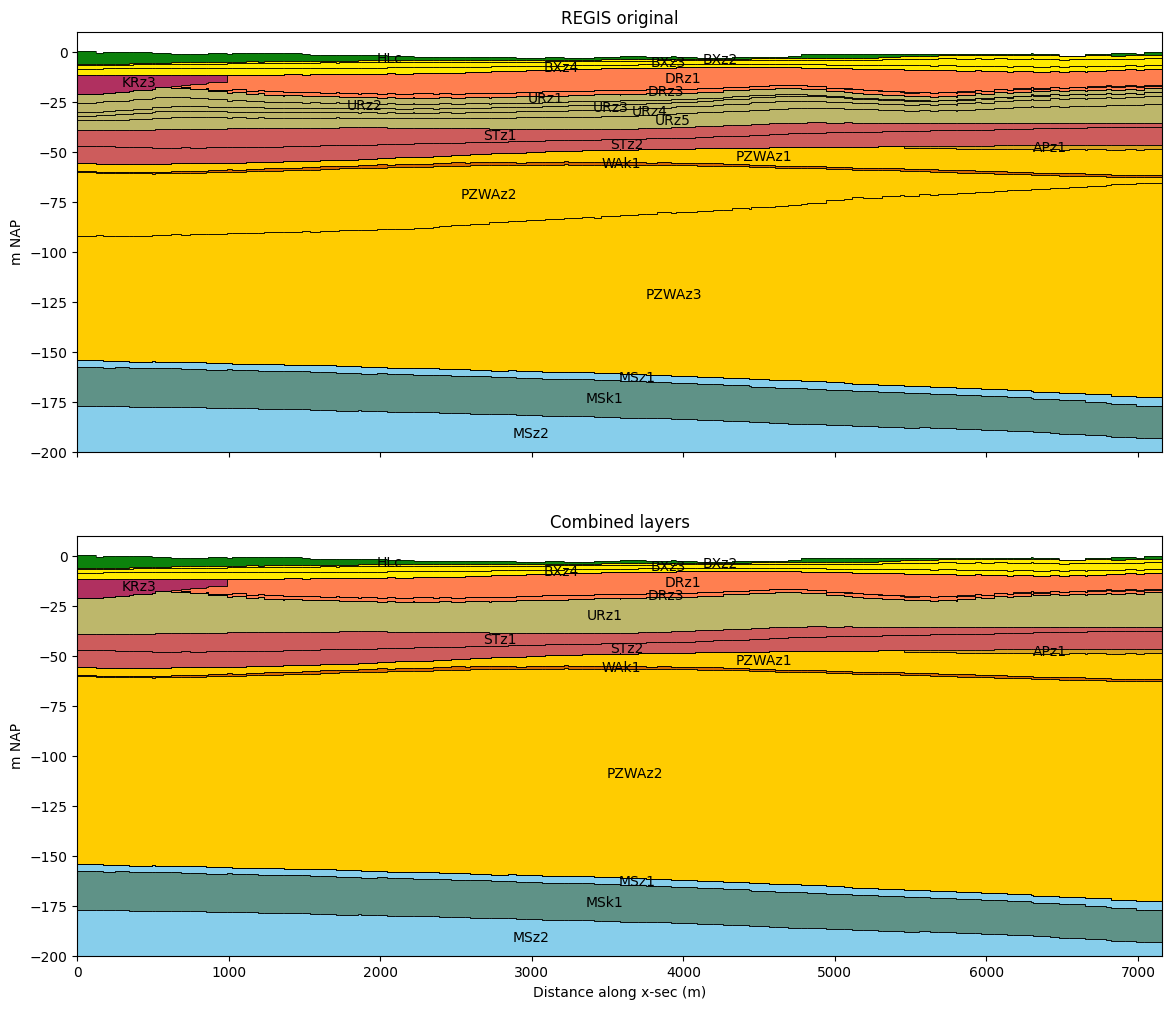
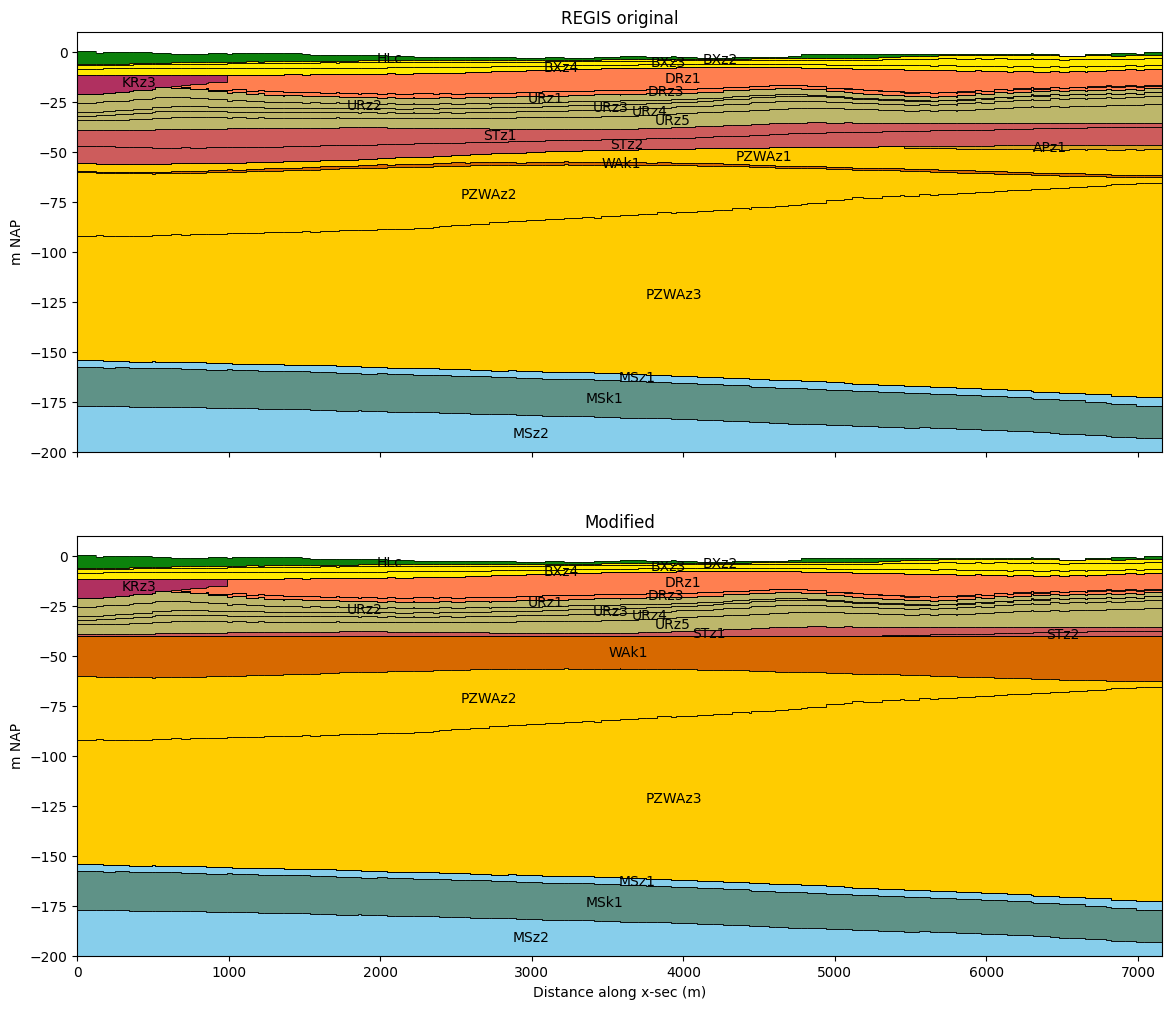
nlmod.layers.set_layer_top sets the layer top to a specified value or array.
This method only changes the shape of the layer, and does not check if all hydrological properties are defined for cells that had a thickness of 0 before.
ds_new = nlmod.layers.set_layer_top(ds.copy(deep=True), "WAk1", -40.0)
compare_layer_models(ds, line, colors, ds2=ds_new, title2="Modified")
Set layer bottom
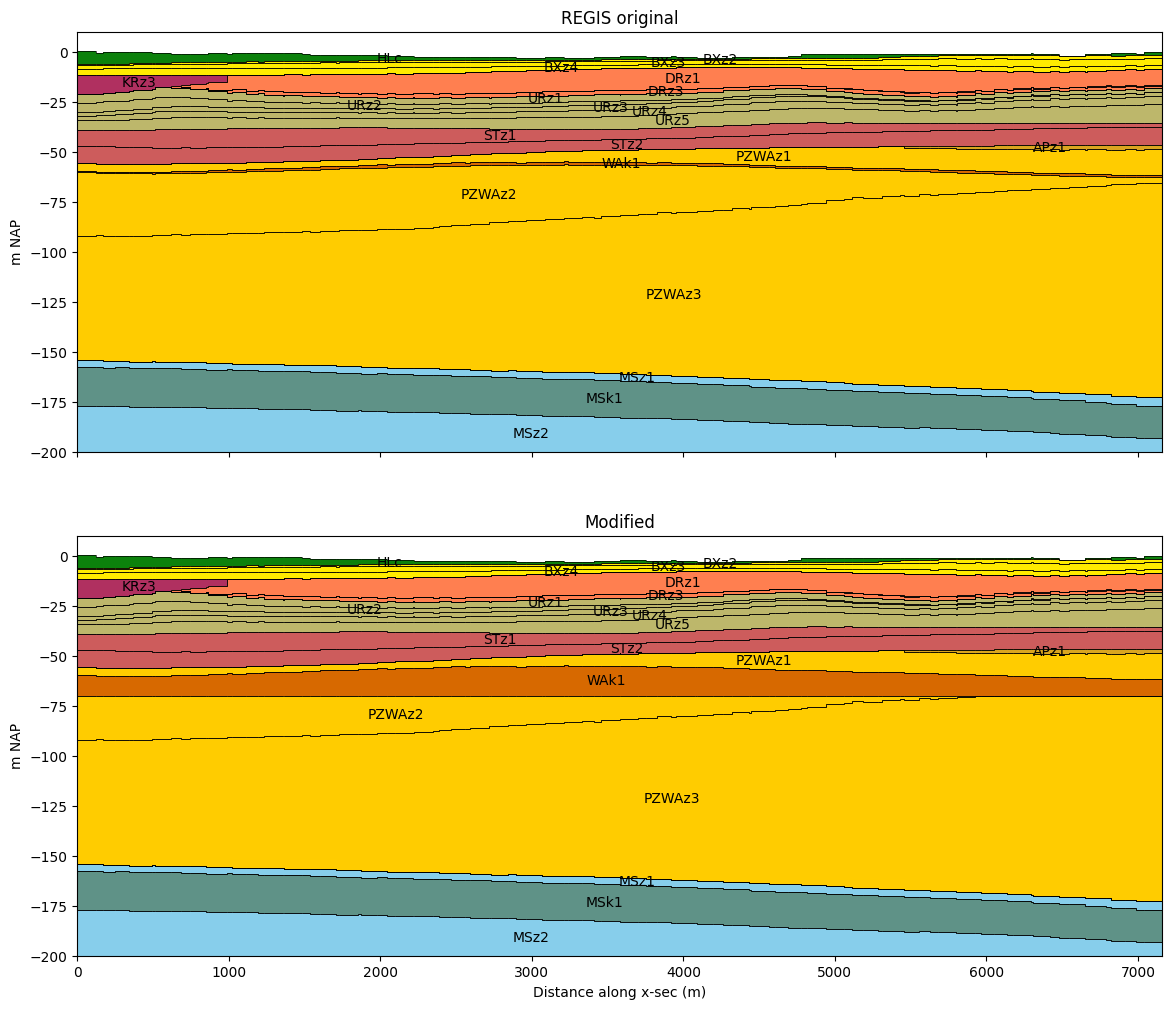
nlmod.layers.set_layer_botm sets the layer botm to a specified value or array.
This method only changes the shape of the layer, and does not check if all hydrological properties are defined for cells that had a thickness of 0 before.
# set the botm of 'WAk1' to -70 m NAP
ds_new = nlmod.layers.set_layer_botm(ds.copy(deep=True), "WAk1", -70.0)
compare_layer_models(ds, line, colors, ds2=ds_new, title2="Modified")
Set layer thickness
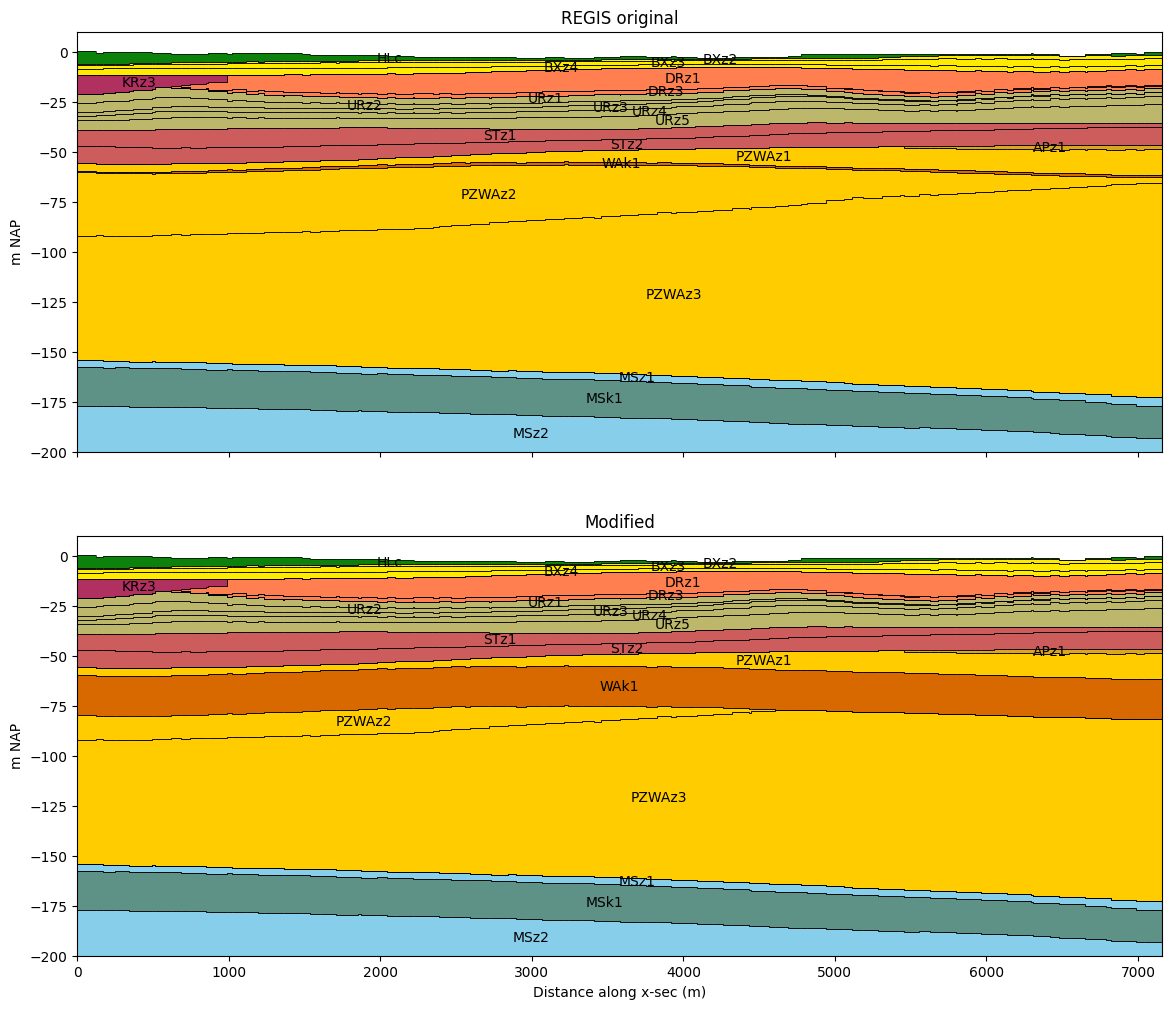
nlmod.layers.set_layer_thickness sets the thickness of a layer to a specified value or array. With a parameter called ‘change’ you can specify in which direction the layer is changed. The only supported option for now is ‘botm’, which changes the layer botm.
This method only changes the shape of the layer, and does not check if all hydrological properties are defined for cells that had a thickness of 0 before.
# set the thickness of 'WAk1' to 20 m NAP
ds_new = nlmod.layers.set_layer_thickness(ds.copy(deep=True), "WAk1", 20)
compare_layer_models(ds, line, colors, ds2=ds_new, title2="Modified")
Set minimum layer thickness
nlmod.layers.set_minimum layer_thickness increases the thickness of a layer if the thickness is less than a specified value. With a parameter called ‘change’ you can specify in which direction the layer is changed. The only supported option for now is ‘botm’, which changes the layer botm.
This method only changes the shape of the layer, and does not check if all hydrological properties are defined for cells that had a thickness of 0 before.
# set the minimum thickness of 'PZWAz2' to 20 m
ds_new = nlmod.layers.set_minimum_layer_thickness(ds.copy(deep=True), "PZWAz2", 20.0)
compare_layer_models(ds, line, colors, ds2=ds_new, title2="Modified")